The problem it solves
Ask an AI agent to do a ten-step job by itself and it will usually get most steps right. That is the problem. If each step is 90% right, five steps in a row are right only 59% of the time. The errors add up, and the agent sounds just as confident when it is wrong.
The fix is not a smarter prompt. It is to stop asking the model to do the parts that code can do better. A model is good at judgement: what matters, what to say, what to try next. Code is good at doing the same thing the same way every time: fetching a page, counting, checking, rendering a PDF.
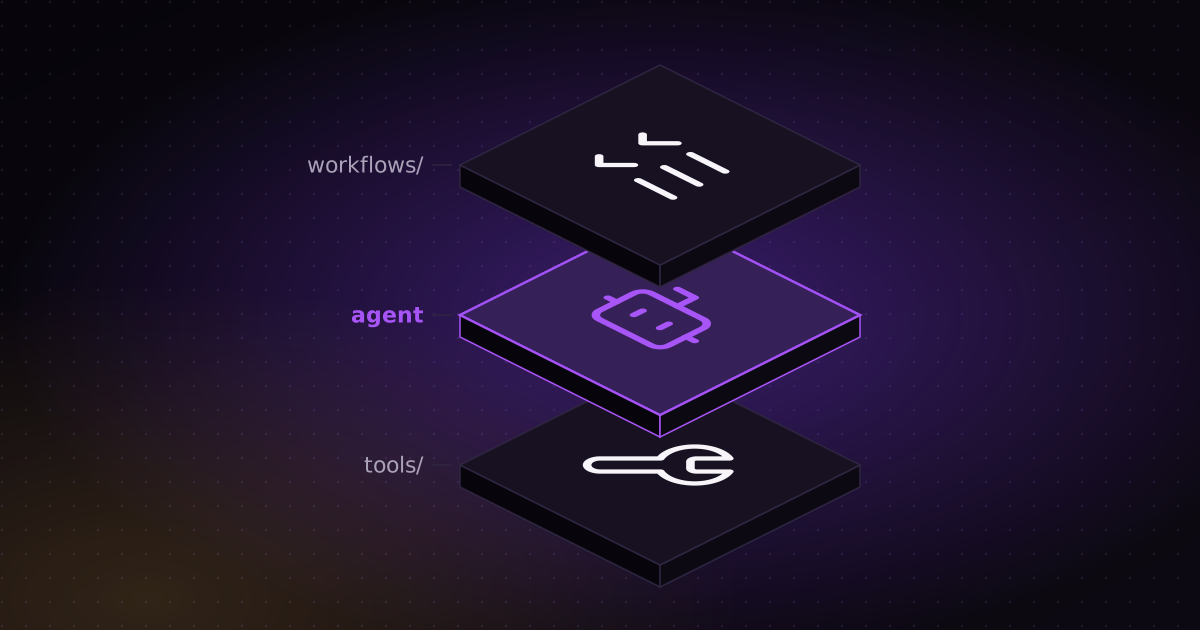
The three layers
Workflows
Markdown instructions in workflows/. Each one says the goal, the inputs, which tools to use, what the output looks like and how to handle edge cases. Written the way you would brief a colleague.
Agent
Claude Code. It reads the workflow, makes the decisions, runs the tools in the right order, recovers from errors and asks when something is unclear. It connects intent to execution without doing every step by hand.
Tools
Python scripts in tools/ that do the actual work: API calls, data clean-up, files, databases. They are fast, testable and give the same result every time. Keys live in .env.
A typical project looks like this:
CLAUDE.md      # the rules: you are the agent, this is how you operate
workflows/     # Markdown instructions: what to do and how
tools/         # Python scripts that do the work
schemas/       # JSON contracts between the agent and the tools
.tmp/          # intermediate files, safe to delete
.env           # API keys, never committed
How to use it well
The structure alone does not make a project reliable. These are the rules that do, each one taken from a project I have shipped.
- Write the workflow before the code. If you cannot write down the goal, the inputs and what "done" looks like, the agent cannot guess them either.
- Let the model decide and the code execute. If a step must give the same result every time, it is a tool. Fetching, counting, merging, drawing charts and rendering are never left to the model.
- Put a contract between them. The agent writes JSON, and a JSON Schema checks it before anything slow or expensive runs. In my video generator, a storyboard that fails the schema never reaches the renderer.
- Add a gate that can say no. In my research workflow, a validator blocks the PDF if any claim has no source or any link is dead. The AI is told the rules. The code enforces them.
- Stop for a human at fixed points. The research workflow pauses at four checkpoints, for example to approve the competitor list before nine research agents start. Mistakes are cheap to fix early and expensive to fix late.
- Reuse tools before writing new ones. The agent checks
tools/first. New scripts only appear when nothing fits, so the toolbox stays small and tested. - Cap the retries. In the video generator, a reviewer agent returns SHIP or a list of fixes, and gets two rounds at most. Then the run stops. An agent that can loop forever will.
- Turn every failure into a better workflow. When a tool breaks, the agent fixes it, tests the fix, and writes what it learned into the workflow: a rate limit, a slow API, a site that blocks bots. The next run does not hit the same wall.
- Ask before spending money. If a fix means re-running paid API calls, the agent asks first.
- Give the agent only the tools it needs. An allowlist of scripts, not open shell access. Secrets stay in
.envand out of git.
A CLAUDE.md to start from
Claude Code reads CLAUDE.md at the start of every session, so that is where the framework lives. A short version:
# Agent instructions

You work inside the WAT framework.
- Workflows: before acting, read the matching file in workflows/.
- Agent: you decide and run the tools in order.
  Don't do by hand what a tool already does.
- Tools: scripts in tools/. Look for an existing tool
  before writing a new one.

When a tool fails: read the full error, fix the tool,
test it again, and write what you learned into the workflow.
Ask before re-running anything that costs money.
Don't overwrite a workflow without asking.
When not to use it
A one-off question or a quick edit does not need three layers. WAT pays off when the job repeats, when it has many steps, or when a wrong answer costs something: a report that goes to a client, a video that goes out under a brand, an audit someone will act on.
See it in real projects
- Research workflow with a validator: 61 pages, about 190 sources, no unsourced claims.
- AI video and image generator: schema check, QA step and a reviewer with two rounds at most.
- Website audit for Google and AI search: rule-based checks as tools, Claude agents for the analysis.
- The code: github.com/elkushi/claude_vibe_coding_projects